Beam Alignment
Every SmartBeam is aligned at the factory to aim at the centre of its reflector. If you need to change the beam's height, use the rotary dial on the front of the sensor.
Check alignment
Separate the reflector from its transport position on the sensor. Place it opposite the sensor, with its reflecting surface facing back toward the sensor.
- For a line-based split, position the beam across the chosen line rather than diagonally along the sheet. Use a consistent reference on the painted line when repeating a setup.
- Aim the sensor until the arrow-shaped beam-state LED shows green.
- With the system disarmed, briefly interrupt the beam and then clear it. The arrow should turn red, then return to green.
- Recheck after either the sensor or reflector is moved or bumped.
Never look directly into the laser beam. Read Laser Safety before setup. See LED Indication for the beam-state indicator.
Adjust the beam height
With the sensor aimed toward the reflector, turn the dial in small increments. Viewed from above:
- Turn clockwise to raise the beam.
- Turn anticlockwise to lower the beam.
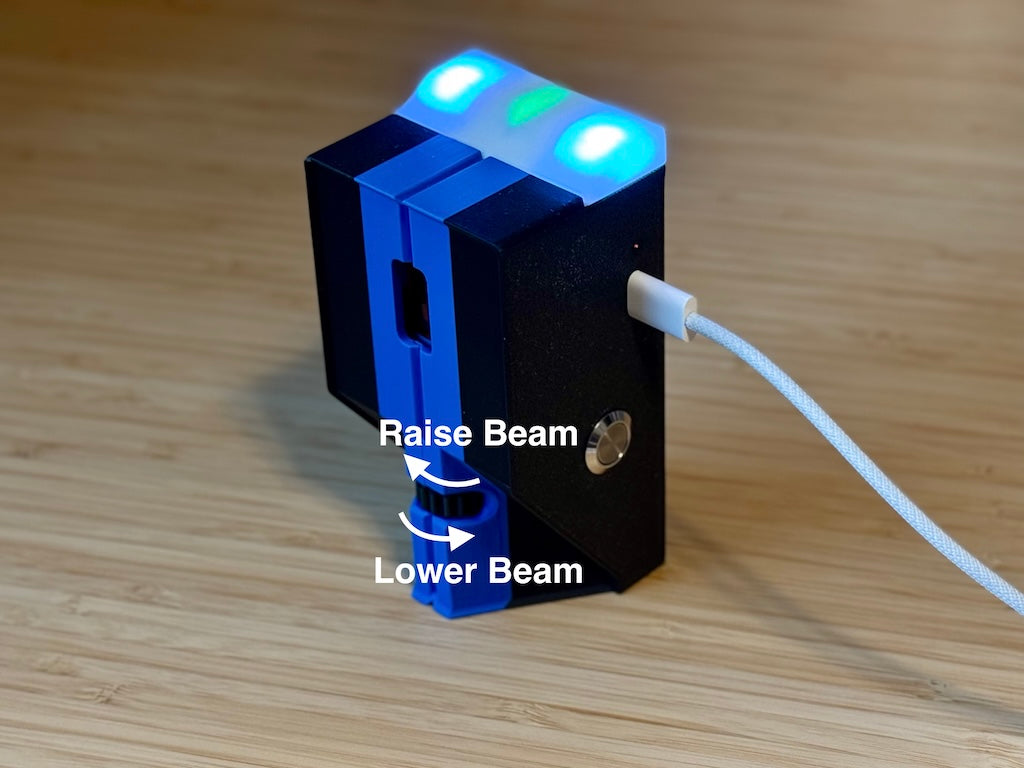
Watch the arrow-shaped beam-state LED as you adjust, then repeat the alignment check.
Find flatter ice
The extreme edges of a sheet are often uneven. If you are having trouble hitting the reflector, move both the SmartBeam sensor and reflector a little toward the centre line to find flatter ice, then check the alignment again.
Use Choosing Measurements to select locations, then Setting up Beams to match them in the app.